
Inside a presentation template system: how we built 37 master slides for Yuno
A template is not a cover and three layouts. How we planned a system for a global payments company so any team member can build an executive deck without a design request.


Yuno, a global payments platform, produces presentations constantly: product updates, sales decks, partner materials and board reports. Every new deck used to mean another design request, another delay and another inconsistency. Instead of designing one more presentation, we built the system behind all of them, in one week.
Start from the decks people actually make
A template fails when it is designed around a cover and a few pretty layouts, and then real content arrives. So we started from the content situations a fintech team faces every week and gave each one a layout: processes, comparisons, timelines, team, data and covers.
- Processes in 2, 3, 4 and 5+ steps.
- Comparisons in two and three columns.
- Team grids, horizontal timelines and roadmap breakdowns.
- Quote slides and section dividers.
- Data slides with chart and table placeholders already built in.
One accent, used with intent
The visual language is high-contrast: deep blacks and graphite for a premium dark theme, crisp whites and soft greys for light. A single electric blue accent guides the eye to key metrics, calls to action and critical financial data, never to decoration. One accent is a rule people can follow without a designer in the room.
What the system contains
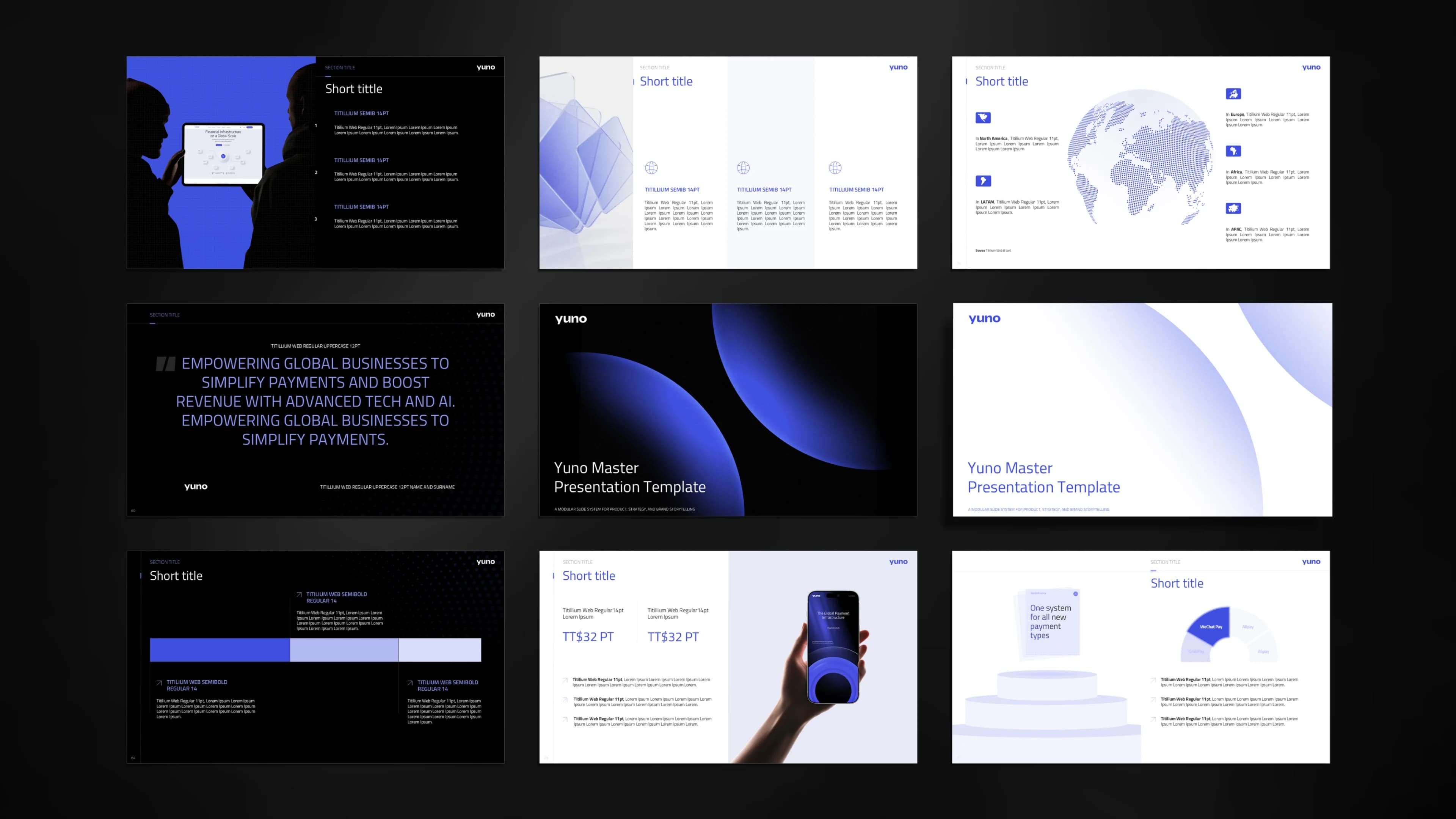
- 37 core master slides, each in several layout variations.
- Two complete themes, light and dark.
- Nine layout categories, from processes to data.
- A custom asset pack, with Titillium Web for headlines and body.
Why masters, not example slides
Example slides get copied, edited and drift. Master layouts with real placeholders keep titles in place, text at the right size and charts in the right colours, whoever builds the deck. That is the difference between a template and a style guide, which we wrote about in brand guidelines are not a template.
The result
A plug-and-play system that lets the Yuno team build consistent, executive-grade decks in hours instead of weeks, without a design request. It also means any old deck can be moved onto the new master quickly, which is the job wetria's Adapt to template does.
Frequently asked questions
How many slides should a presentation template have?
Enough to cover every recurring content situation. Yuno's system has 37 master slides across nine categories, each with variations, in light and dark.
How long does a template system take?
Yuno's took one week. Scope depends on the number of layouts, themes and assets.
Can old decks be moved onto a new template?
Yes. Each slide has to be rebuilt from the new layouts. wetria's Adapt to template does this automatically, keeping every word.
Keep reading
All articles
Template systems that scale: a system, not a folder of files
A style covers one deck. A system covers every deck after it — including the hundredth, built in a hurry by someone who never met the designer.
Read article
How to put an existing deck on your company template without rebuilding it by hand
Copy-paste onto a new master breaks every slide. Here is what a proper move onto a company template involves, what to check, and how to do it in minutes instead of a day.
Read articleNeed a presentation that
actually lands?
We design pitch decks, investor reports,
and keynote materials that communicate clearly and win the room.